By John Fairfull
File Label Express is a web application that creates data-driven labels and provides basic records management with its Pro package. It serves filing requirements for organizations large and small. Implement records management strategies from the ground up, starting with standard labels, and then continue to adapt them to meet your specific requirements.
User Interface
We create custom record entry forms tailored to your needs and provide coverage to your entire enterprise by implementing new projects. Begin your journey by generating professional, standard labels for both side and end tab filing systems. You may enter multiple records at a time or create a single entry. Either method will render labels while adding new records to the database. As you enter data, you eliminate duplicates.
Through this system, you not only create new trackable records, but you also produce high-quality, high-end labels that enhance the efficiency of your filing system.
Batch Import
In many cases, files originate from some other business process—import data in bulk from a spreadsheet to utilize it seamlessly in your filing system. Our batch importer allows you to map fields on the fly from any spreadsheet in Excel format (.csv, .xls, and .xlsx). Duplicate entries are detected and removed.
Sample Labels
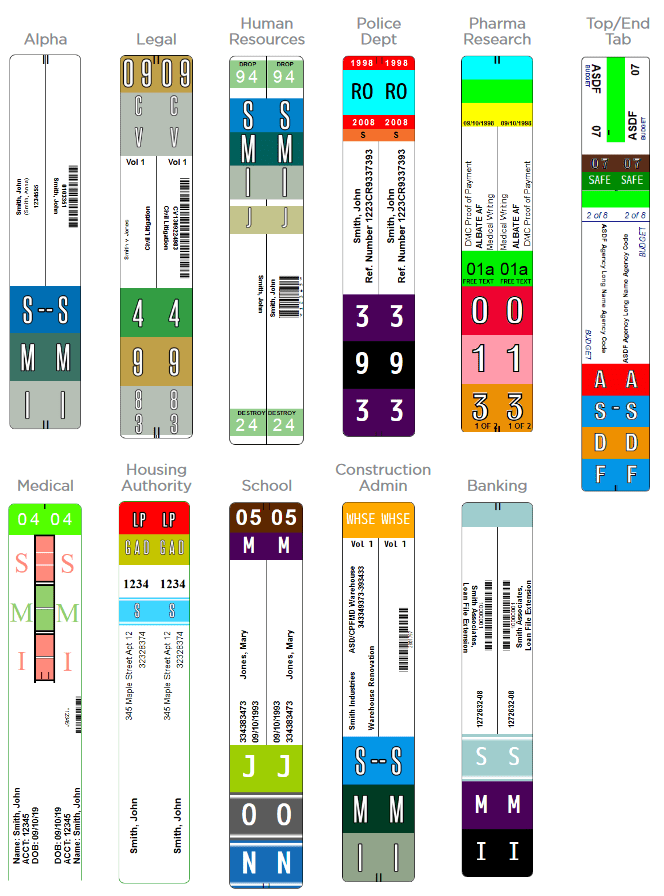
Records Management
With an affordable software upgrade, you can store and manage data to take the next step in your records management strategy.
Features
- Store and search your record data
- Batch reprint labels at any time
- Create reports
- Batch Export (to use your data in other applications)
- Label switching, depending on field value
- Enable basic tracking with status and location fields
- Introduce non-label record fields to customize your system further
While you enter record data for your filing system, why not also compile useful information in one place to effectively manage your records?
File Tracking
Upon entering the tracking system, you will see an open index of all records in the database. Each index value is searchable by simply selecting it, which links to record types. To view all records in a location, click the link for that location in the record data. The software will return all documents in that location. Status fields are searchable in the same manner.
Search
For more advanced search requirements, we can customize a search form to your exact specifications at no additional cost using our electronic form engine. Our software is flexible and customizable enough to meet advancing requirements. Our architecture allows you to change and adapt without disturbing past strategies.
Lists
Select items from the tracking interface to compile a list. Lists are helpful for the following operations:
- Transfer or check records out to locations or associates
- Export index data for use in storage or scanning
- Create a report
- Batch update all records based on rules you establish
- Batch reprint labels before or after batch updating them
Reports
Reports are created similarly to lists. Search and select the desired records from the main tracking screen, add them to a report, and then provide a name and additional notes to export the record report in PDF format.
Once created, our integrated viewer allows you to annotate the report with redactions, highlights, and sticky notes. In addition, the viewer enables you to:
- Print the Report
- Share the Report
- Download the Report
- Add pages of information relevant to the report from your workstation or network share.
Customize reports to your exact needs and create them with a single click.
Status and Location
Status and location fields are the backbone of a basic tracking system. They serve to keep records organized and accounted for. Status fields accommodate various strategies for managing your records when it comes time to archive, scan, or destroy them. We use these fields to create precise reporting on the state of the record system. In our mobile app, we provide a menu for locating records and assigning them a new location or status based on their current location and the action you take with them. For batch update, you can add them to the form that allows the bulk transfer or reassignment of status values.
For a check-in/check-out system, we utilize the status to facilitate this process. For records that have been or will be scanned, we assign a status to reflect pending actions or actions that you completed. For storage, we apply an archived status. Combined with the location field, you can quickly get a granular view of your management process. Create lists to perform batch operations that easily manipulate multiple records.
Records Retention
Add a destruction date, scan date, or archive date to your records. You can create a simple retention scheme, which takes the records management system beyond managing physical records. We can configure these fields in the manner that best suits your needs.
Label Switching and Batch Reprints
File Label Express can compile records for batch reprints or modify record data to create an entirely new label that reflects a change in record status.
The most common use of the switch is to render records active that had previously been inactive or vice versa. In many cases, we use a separate color bar to make these types of records noticeable or conspicuous from other documents in the same set. You may also bring records forward from year to year. We can batch these together for a reprint of entire strip labels, or use the switch new year bands alone, which you can print to simplify tasks from time-consuming and tedious to simple, quick, and precise.
Batch Export of Record Data
File Label Express enables export of record data. For example, locate your storage records, assign a box number, send a detailed inventory to your storage vendor, and update the location of those records to storage.
Why File Label Express?
File Label Express was designed and developed by records management professionals to provide a high-quality, responsive web solution for your filing requirements. We are the low-cost provider for color-coded file labels and print services.
Are you in the market for a filing system, or are you still relying on your office supply provider, filing system dealer, or RMS software provider for file label and tracking solutions? We offer a factory-direct option for label creation, utilizing our proprietary technology to significantly reduce costs. We manufacture our labels to exact specifications. Our position as a large-volume provider enables File Label Express to offer labeling technology and label stock at wholesale prices.
File Label Express
- is user-friendly
- has no risky dependencies
- requires only a modern browser
- is device and OS agnostic
- uses the latest technology
- is affordable
Contact us today to schedule a complimentary consultation.